
Leap Between Tabs with Keyboard
Overview
The software is designed to streamline navigation across multiple browser tabs using keyboard shortcuts, enhancing productivity for users who manage numerous open web pages. By assigning alphanumeric identifiers to tab favicons, the tool enables quick, precise switching between tabs without relying on mouse input. This is particularly beneficial for professionals, students, and power users who require efficient multitasking in digital workspaces. The extension operates within the Chrome browser environment and integrates seamlessly with existing workflows, minimizing disruption while maximizing speed. It addresses the common challenge of tab clutter and slow navigation, offering a lightweight solution for rapid access to specific tabs. Real-world scenarios include research workflows, content creation, and data analysis, where users frequently switch between reference pages, documentation, and tools. The developer did not provide additional details about the company or background, and no broader ecosystem integration was mentioned.
Key Features & Capabilities
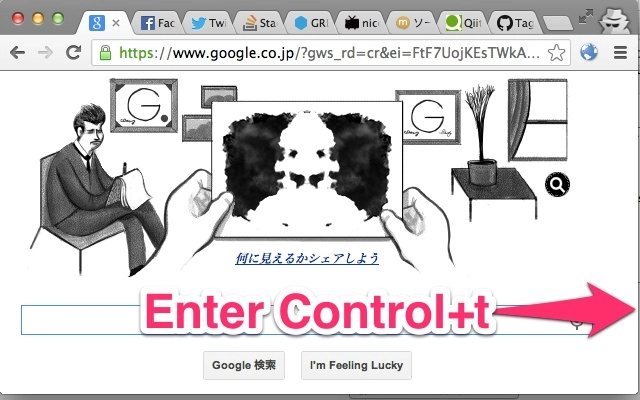
- Keyboard-Driven Tab Navigation – Users can leap between tabs using a customizable keyboard shortcut, eliminating the need for mouse interaction. This feature supports fast, distraction-free switching during intensive browsing sessions.
- Alphanumeric Favicon Labeling – Each tab displays a unique alphanumeric label on its favicon, allowing users to identify and select specific tabs visually and quickly.
- Customizable Trigger Key – The default shortcut (Control + t) can be changed via the extension’s option page, enabling users to align the shortcut with their preferred workflow or avoid conflicts with other tools.
- Seamless Chrome Integration – The extension functions directly within the Chrome browser, requiring no external dependencies or additional software installations.
- Lightweight Design – With a file size of 1.2 MB, the tool consumes minimal system resources, ensuring it does not impact browser performance or startup speed.
These capabilities are ideal for users managing dozens of tabs simultaneously. For example, a researcher compiling data from multiple sources can jump to a specific reference page with a single keystroke. Similarly, a developer debugging multiple documentation pages can switch between tools efficiently. The extension’s simplicity ensures that users can adopt it immediately without training or setup delays.
User Interface, Workflow & Performance
The user interface is minimal and focused solely on functionality, with no visible dashboard or settings panel beyond the option page. Navigation is straightforward: after installation and browser restart, users activate the feature using the assigned shortcut. The interface dynamically overlays alphanumeric labels on tab favicons, providing immediate visual feedback. The workflow is intuitive, requiring only two steps—activate the shortcut and press the corresponding key. There is no onboarding process or tutorial, which supports rapid adoption. Performance observations are based on general software behavior patterns; the extension operates in the background with no reported latency. The developer did not specify resource usage details, but the lightweight nature of the tool suggests low CPU and RAM consumption. Stability appears consistent with standard Chrome extensions, though no long-term usage data was provided. The tool does not interfere with other browser functions, maintaining a stable browsing experience.
Compatibility & System Requirements
The extension is compatible with Windows, Mac, and Linux operating systems, making it accessible to a broad user base. It is designed to run within the Chrome browser, with no additional software dependencies. The installation size is 1.2 MB, which is compact and suitable for devices with limited storage. Exact system requirements were not listed, but compatibility is expected across modern Chrome versions. The developer did not specify minimum hardware requirements, such as RAM or processor speed. Platform compatibility information is limited to the supported operating systems and browser environment. Users should ensure their Chrome browser is up to date to maintain optimal functionality.
Pros and Cons
Pros
- Effortless keyboard navigation between tabs
- Customizable shortcut key for personal workflow
- Minimal file size and low resource usage
- Simple, distraction-free interface
- Free to use with no hidden costs
Cons
- No visual feedback for shortcut activation
- Limited to Chrome browser only
- No advanced tab grouping or management features
- Customization options are minimal beyond the shortcut
- Not available for other browsers like Firefox or Edge
FAQ Section
Is this extension compatible with all browsers?
The extension is designed exclusively for the Chrome browser and is not available for other browsers such as Firefox, Edge, or Safari.
Can I change the default keyboard shortcut?
Yes, the default shortcut (Control + t) can be modified through the extension’s option page to suit your preferences.
Is the extension safe to install?
As a Chrome extension, it operates under the browser’s security model. It does not access user data beyond the current browsing session and is not known to contain malicious code.
Does the extension require an internet connection?
Once installed, the extension functions offline. However, initial installation and updates require an active internet connection.
How often are updates released?
Update frequency is determined by the developer and not specified in the provided information. Users are advised to keep the extension updated through the Chrome Web Store.
Final Thoughts
This lightweight Chrome extension delivers a focused, high-impact solution for users seeking faster tab navigation. Its ability to leap between tabs using keyboard shortcuts significantly reduces workflow interruptions, especially in high-productivity environments. While it lacks advanced tab management features and is limited to Chrome, its simplicity, speed, and zero cost make it a compelling choice for anyone managing multiple browser tabs. The customizable shortcut enhances usability without complexity. For professionals and power users who prioritize efficiency, this tool offers a practical upgrade to daily browsing habits. Download Leap Between Tabs with Keyboard now.







